The most intuitive
reading app built for
everything you save
Articles, bookmarks, notes, voice notes, and files — all in one place,
with distraction-free reading and an AI assistant.
Your ideas, always within reach
One place for everything you save
Simple and Orderly
Save your favourite ideas and inspirations into comfortable collections & tags or let our AI suggest it for you
Intelligent & Intuitive
From web links to voice notes, Shelfy's AI analyzes every resource — summarizing, tagging and pulling out key features. Search becomes effortless with results based on meaning and context, and you can even chat directly with your documents to get answers fast.
Powerful AI Agent
Your personal agent that actually understands your content. Ask questions across your entire library, get instant answers with sources, and let AI surface connections you'd never find manually.
Distraction-free Reading
Shelfy makes reading effortless — turn any article into a clutter-free view, save it to your Read Later list, and mark them as read when you're done.
Smart AI-Shuffles
Auto-generated combinations of your saved resources based on themes, topics, or patterns. Organizing is good — but not have to organize is even better!
Use Cases
See how Shelfy fits your workflow
Rich toolset to get the most
out of your resources
And you can request more! We are there to assist you.
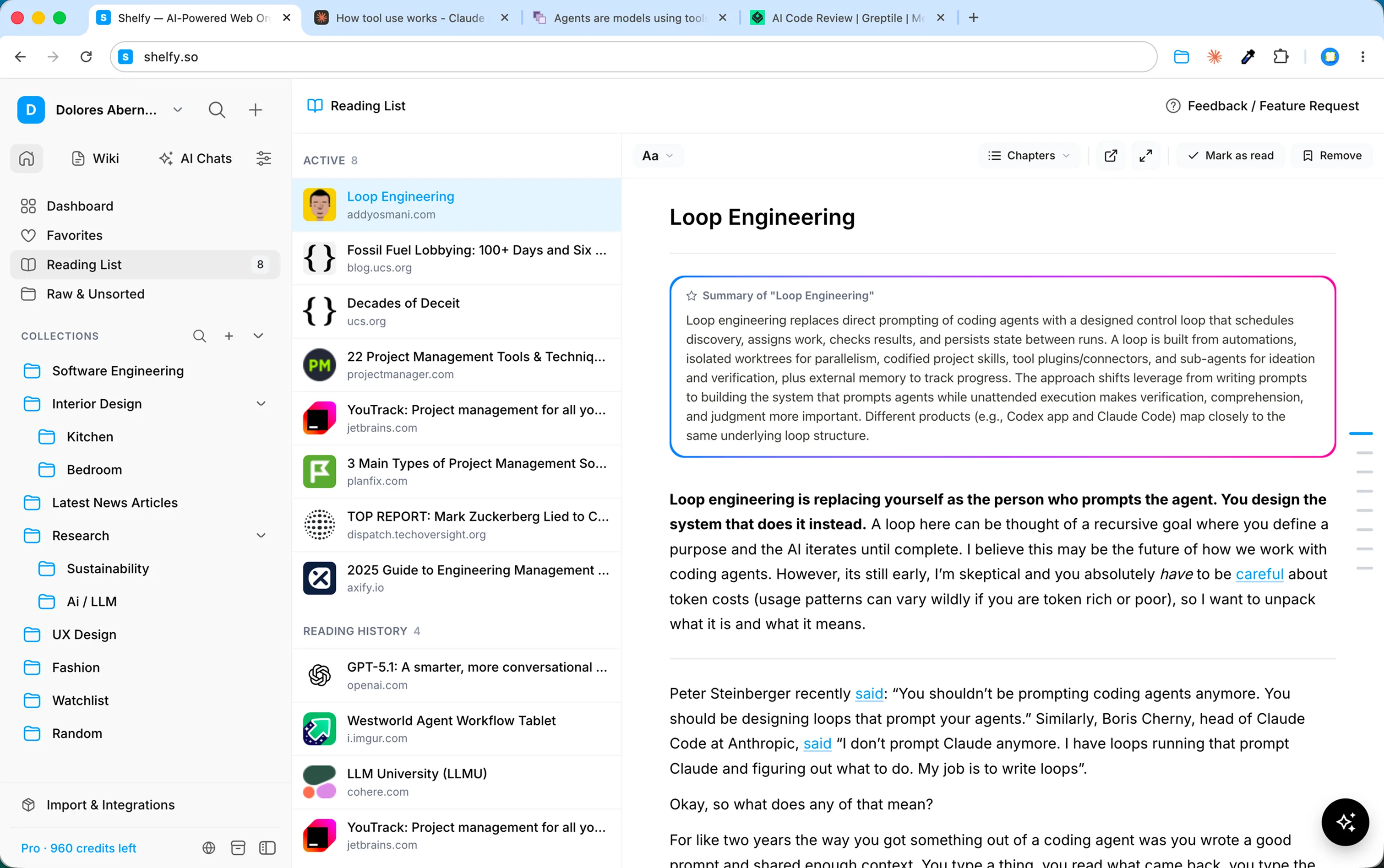
Reading mode and history
Turn any article into a clutter-free view. Save to your Read Later list, track what you've finished, and pick up where you left off — distraction-free.
All known resource types
Bookmarks, PDFs, images, rich text notes, voice memos with automatic transcription — save anything you need in one place. No more switching between apps to store different content types.
AI Assistant
Ask questions about your saved content and get answers from any resource — or your entire library. Soon, it will act on your behalf: organizing your resources and working with your connected apps.
Auto-tagging and summarizing
Every resource you save gets analyzed automatically. Shelfy extracts key points, generates summaries, and suggests relevant tags. For images, it identifies colors and describes what's in them — so you can find anything without manual effort.
Wiki & Topics
Shelfy compiles resources on the same topic into living wiki articles that update automatically as your library grows. Browse your knowledge by topic — like your own personal encyclopedia.
Clean, intuitive interface
No clutter, no learning curve. A simple layout that lets you focus on your content — not on figuring out where things are.
Browser extension
Save any page, article, or image with one click — right from your browser. No copy-pasting, no switching tabs. Just click and it's in your library.
Import from major platforms
Switching from Pocket, Raindrop, or browser bookmarks? Import your existing library in seconds. No need to start from scratch.
Auto-organizing Ai-shuffles
Shuffles are auto-generated combinations of your resources based on themes, topics, or patterns. Rediscover, group, and combine — without the effort. Organizing is good, but not having to organize is even better.
Classic and intuitive search
Search by keyword or by meaning. Shelfy understands context, so you can find that article about 'morning routines' even if you search for 'productivity habits.'
Manual collections and tags
Collections aren't dead — they're just better with AI. Create your own structure with folders and tags, and let AI suggest where unsorted resources belong — or when it's time to create a new collection.
Custom Filters
Filter by name, URL, kind, or any combination. Save your custom filters and jump to the exact view you need in one click. Coming soon: smart AI filters — just describe what you're looking for.
Reminders
Set a reminder on any resource and get notified when it's time to revisit. Never forget that article you saved for later or the link you need to follow up on.
Customer centric
We build what you need. Share feedback, request features, and watch them ship. Shelfy grows with its users — your input shapes the roadmap.
Mobile App (Soon)
Your library in your pocket. Save content on the go, capture ideas the moment they hit, and access everything from anywhere. Coming soon.
Integrations & Agents (Soon)
Connect Shelfy to the tools you already use. Soon, AI agents will move content between apps, sync your workflows, and act on your behalf — automatically.
Simple, transparent pricing
30-day money back guarantee!
Free
Essential tools to save and organize,
plus a small taste of AI.
Pro
Smart AI features and automation
for everyday use.
Pro Agent
Higher limits and power tools
for large libraries.
Frequently Asked Questions
Shelfy is a reading app built for everything you save. Read articles and PDFs distraction-free, and keep bookmarks, notes, voice notes, images, and files in one library — with an AI assistant that tags, summarizes, and finds it all. It adds up to a personal second brain, without the work of maintaining one.
When you save a resource, Shelfy's AI automatically analyzes it — generating summaries, extracting key points, and suggesting relevant tags. It also powers semantic search, AI-Shuffles, and a chat assistant you can query across your entire library. We use trusted third-party AI models to process your content — we never sell or reveal your data for any purpose. Every sub-processor we use is carefully vetted and strictly limited to what's essential. Shelfy is bootstrapped and independent — no outside investors, no competing interests. Our only priority is building something genuinely useful for the people who rely on it.
Bookmarks, web articles, PDFs, images, rich text notes, and voice memos with automatic transcription. You can save from your browser with our extension, import from platforms like Pocket and Raindrop, or add content directly inside Shelfy.
Yes. Your data is stored with trusted infrastructure partners. It belongs to you and only you — we will never sell, share, or use it for marketing under any circumstances. Your content is accessible only to you and any team members you explicitly invite. Nothing more, nothing less.
Absolutely. We're happy to help you bring your data into Shelfy from any source. Just reach out to us through the feedback and feature request option inside the app, and we'll work with you to get everything imported.
Your data is yours. We'll help you export it anytime you want — no questions asked, no hoops to jump through.
Shelfy tries to render every link you save — articles, products, recipes, books — in the most useful and visually appealing way possible. However, some websites restrict access to external services, which can prevent us from displaying the page correctly. If you run into this, let us know through the Feedback tool inside the app and we'll look into it.
Shelfy can only capture publicly accessible pages — content that doesn't require a login to view. If a page sits behind authentication, we won't be able to display it properly.
We're actively building the mobile app right now. Once it's ready, a desktop app will be next on our roadmap.